
Asset tracking
Asset tracking that keeps your register real
One place to see what you own, who has it, and where it should be. Built for tools, equipment, plant and fleet that move across sites and crews with accountability, bulk verification and audits that actually get done.
Get pricing
Read how these teams run MapTrack






Co-Founder & GM of Operations
What you own, who has it, and where it should be
- One register
- every asset type
- Unlimited
- users included
- Mobile-first
- field & office
One place to see what you own, who has it, and where it should be.
MapTrack app · Demonstration data · Captured
See your sites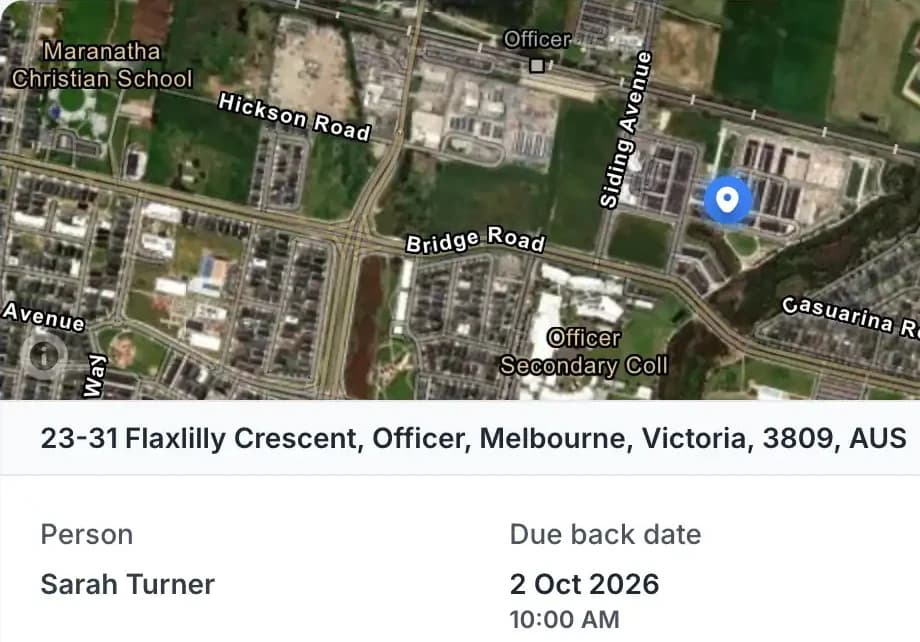
You see custody history and current holder at a glance.
MapTrack app · Demonstration data · Captured
See custody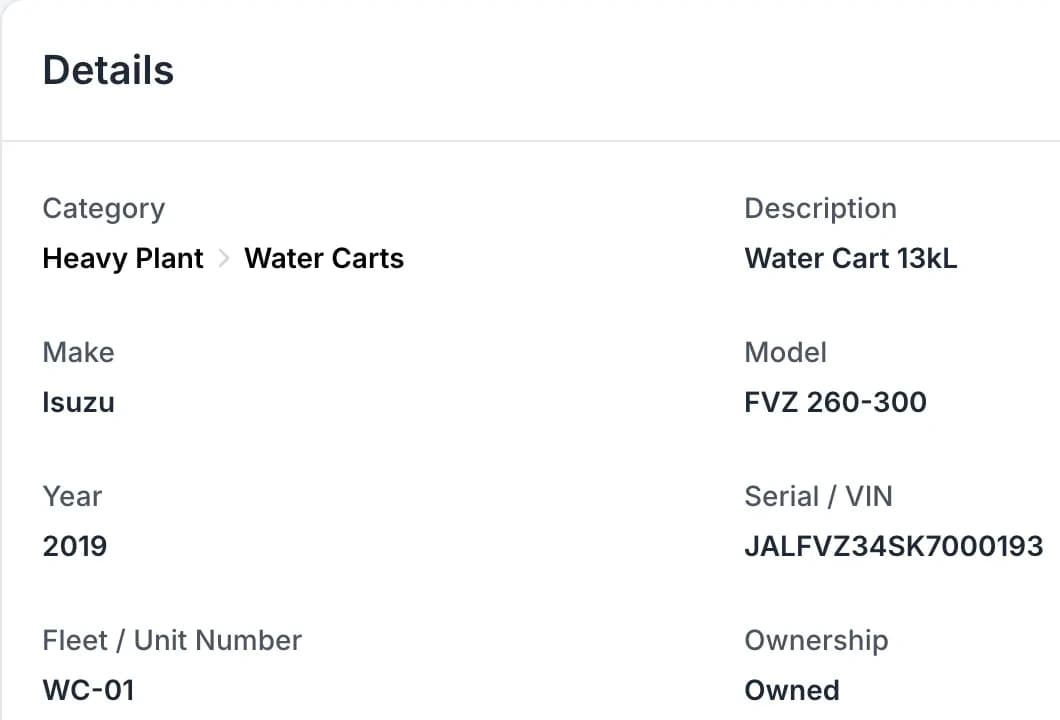
Open any asset and see its specifications, current status, location, maintenance due dates, inspection history and compliance documents.
MapTrack app · Demonstration data · Captured
See one asset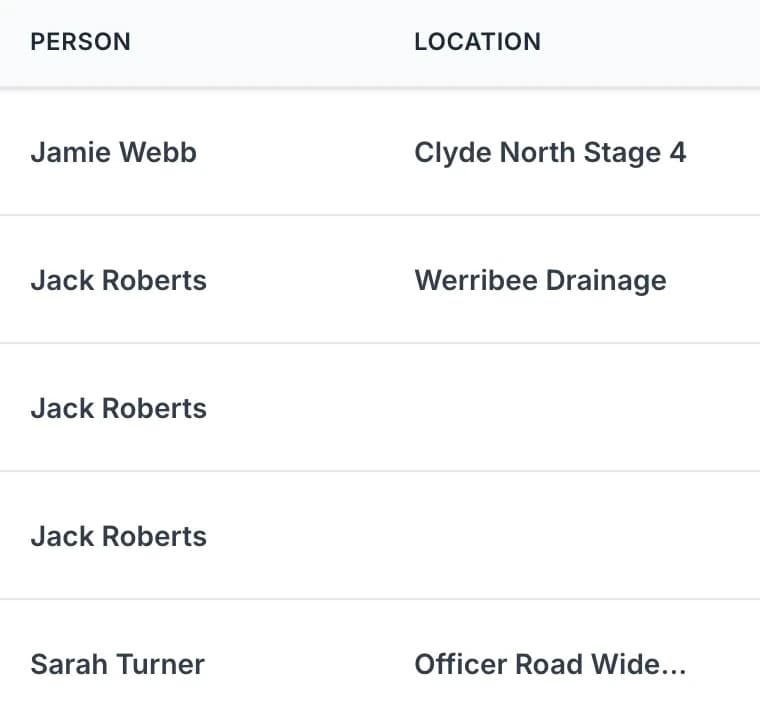
Assign assets to people, crews (through a crew member or crew vehicle), sites or projects (as project sites).
MapTrack app · Demonstration data · Captured
See who has what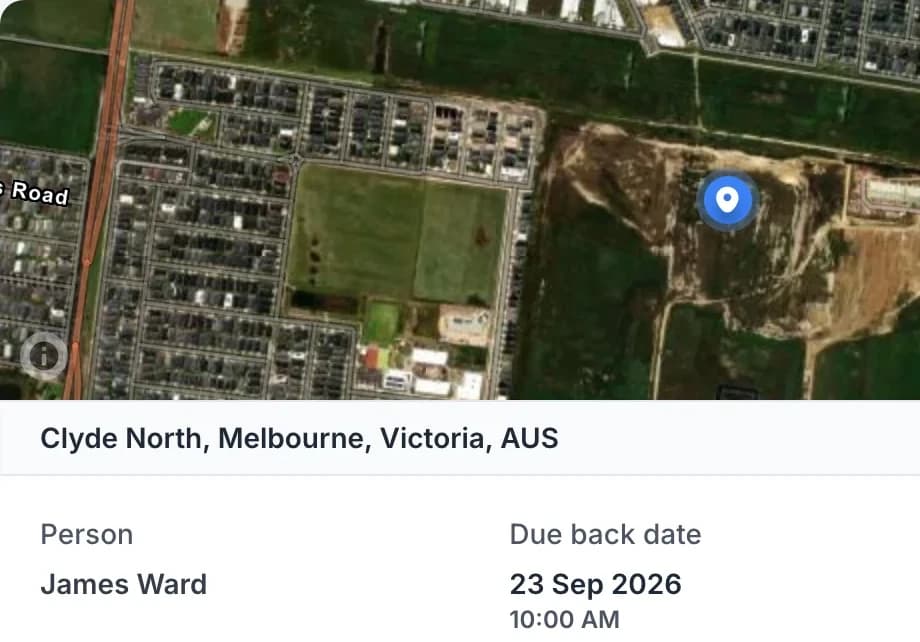
Field teams check in and out from mobile; you see who has what and where it should be.
MapTrack app · Demonstration data · Captured
See how it works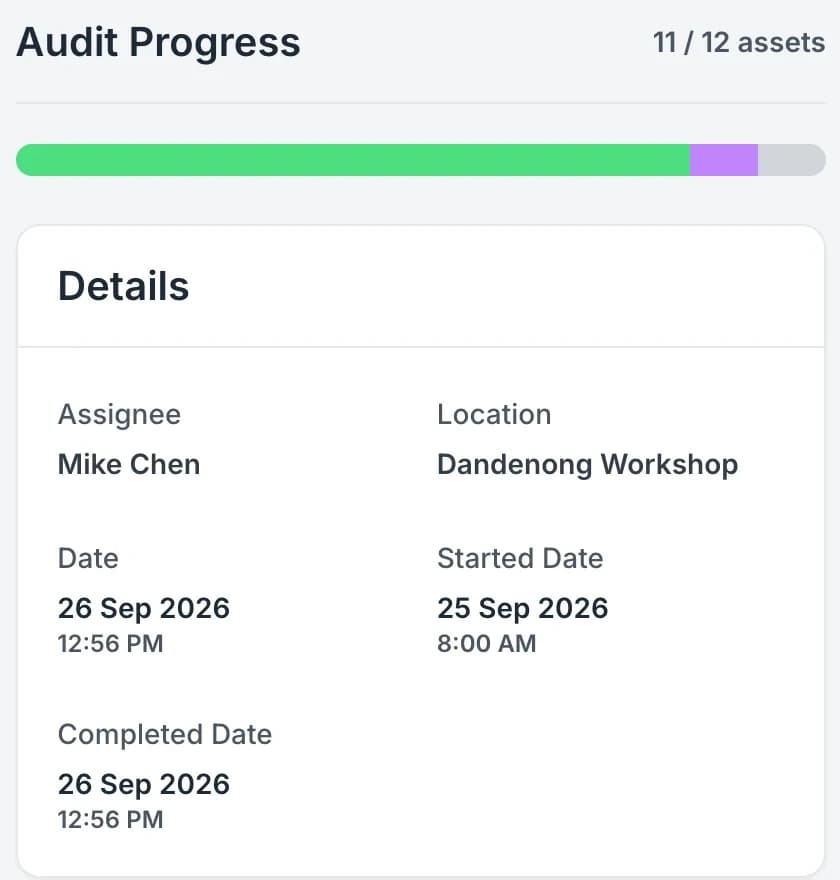
Run fast verification and stocktakes with QR or barcode scanning.
MapTrack app · Demonstration data · Captured
See bulk scanning
Customer outcomes
Results from published MapTrack customer case studies.
Thousands of assets
Achieved a single, real-time view of thousands of assets across multiple remote mine sites, replacing fragmented spreadsheets and legacy systems with one unified platform.
Estimated 25–35%
Better visibility of owned assets across all projects reduced unnecessary equipment hire by an estimated 25–35%
Within hours
Asset transfers between project sites that previously took several days to coordinate and document are now completed and recorded within hours
Customer Story
SPDR on one register for every tool, piece of equipment and fleet vehicle
Scott Bradley, Managing Director at SPDR, on tracking, compliance and fleet visibility
Watch how Specialised Plumbing Drainage and Roofing use MapTrack for tool and equipment tracking, compliance and maintenance.

Show transcript
We’re a good sized company with 100+ plumbers. Loss of tools and equipment over years has probably cost the company tens of thousands of dollars.
We have quite a few different assets, like from cars to trucks, excavators. Just had too many platforms that we were trying to use. That’s when we came across MapTrack.
And now with MapTrack we know where everything is. We know when people swap tools between one another. Everything gets moved digitally. It’s easy to track down, it’s easy to find. We just have one person run around, take photos, enter the data, and we’re up and running within a couple of days.
Through the forms feature, we’ve been using daily safety truck checks. So our mechanic here completes that every day, as well as the truck drivers. A lot of our job sites are commercial sites, so when we have an excavator out on site, we have to show proof of the last time it got serviced. They’re not having to call the office and being like, "Oh hey, when’s the last risk assessment done? When’s this? When’s that?" It’s just all there.
MapTrack’s alerts has drastically changed our ability to service our equipment from both tools, vehicles, and we also get alerts when guys put a wear and tear or damage to equipment comes up straight away. Gets sent directly to me.
Super easy for the guys on site to use. It’s a quick scan of a QR code and click of a button and you’re done. Since the introduction of MapTrack, on-site accountability of their tools has been drastically improved just because they know they’re being watched. We’re no longer misplacing or losing tools, and the wear and tear on our tools has reduced.
MapTrack’s support has been amazing. We’ve been able to deal directly with their team at a drop of a hat. There’s any issues, or we need a new field, or we need to learn something new, a phone call away, it’s answered.
I would say for anyone who’s planning to look at an asset management system, I would highly recommend MapTrack. It’s quick, simple, innovative.
Choose the evidence that answers the asset question
The last location, current custodian and completed service describe different parts of an asset’s history. Bring them together without treating one as a substitute for another.
1. Check custody and the actual issue
Use the assignment and accessory quantities to see what was handed over. A Request records planned demand until its fulfilment creates the linked checkout.
2. Check the source of the location
The app can show the latest GPS position or a Bluetooth-tag gateway detection. Live GPS, geofences, trips and history run in MapTrack Telematics.
3. Inspect the saved work
Review the individual inspection outcome or last service record, then open the linked work order to understand what was recorded.
Trusted by construction, civil and mining teams


One register, one source of truth
Track and manage every asset type in one system, from QR labels to GPS tracking. Assign custody, run audits and keep compliance and maintenance on the same record.
One register for every asset type
Tools, equipment, plant, fleet and inventory. Custom fields and types; AI-assisted creation and imports.
Explore QR tracking →Assign and track custody
Assign to people, crews (through a crew member or crew vehicle), sites or projects (as project sites). Field teams check in/out from mobile; you see who has what.
Explore →Bulk scanning and audits
QR or barcode scanning for verification and stocktakes. Gaps and exceptions visible so you fix drift early.
Explore →Product walkthrough
See your asset register in action
Explore how MapTrack keeps every asset visible, accountable and audit-ready from one register.

Keep small tools in the same register as plant
The same register filtered to small plant and tools. Each tool carries its own QR tag and shows whether it is out with someone or sitting at the workshop or on site.
MapTrack app · Demonstration data · Captured
About this screenshot
Captured in a demonstration workspace. The All assets view is filtered to the Small Plant & Tools category and shows the Status, Person, Location, Tag and Make columns.
One register for tools, equipment, plant and fleet
Custom fields and asset types to match how you work
Filter by status, location, custody or asset type
Full lifecycle history on every asset record
Sites
Who has what and where it should be
Organise assets by site, project or department. Assign assets to people, crews (through a crew member or crew vehicle), sites or projects (as project sites), and see who has what and where it should be.

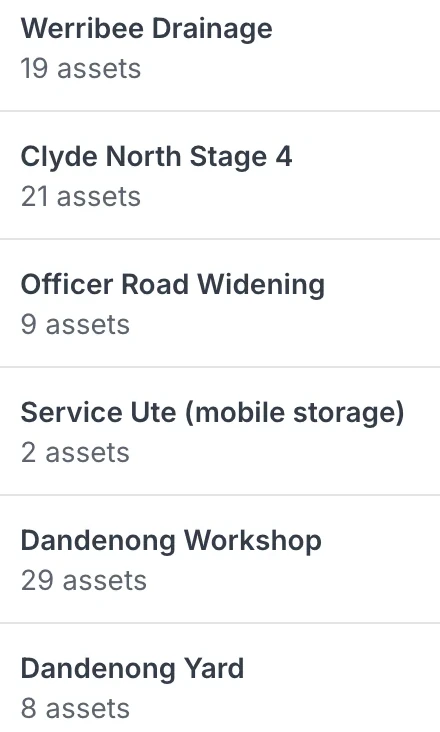
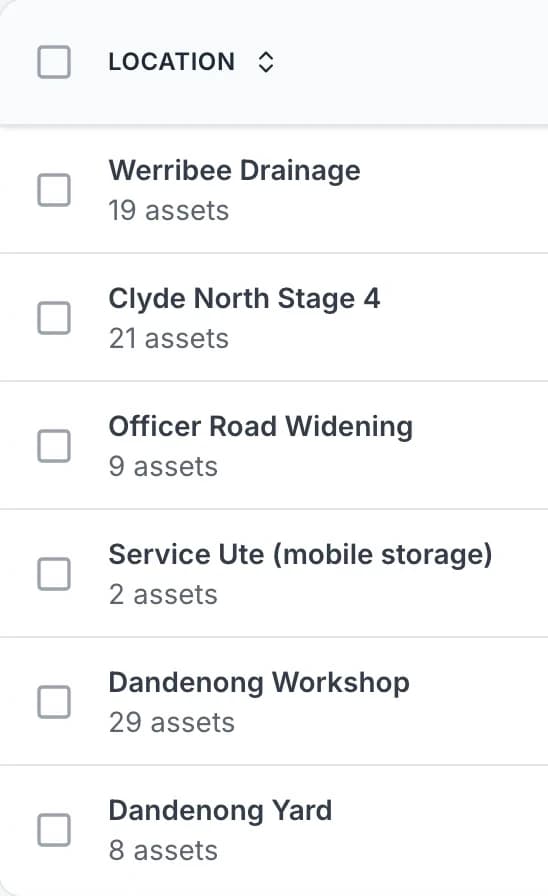
Your sites, with the assets at each
Each site, yard and service vehicle is a location, and the list shows how many assets are at each one.
MapTrack app · Demonstration data · Captured
About this screenshot
Captured at a 1440 x 900 desktop viewport at 2x in a demonstration workspace, right of the sidebar.

See every asset, its status and who or where it is with
The register filtered to heavy plant and vehicles. Each row shows the photo and category, whether the asset is available, deployed or in for repair, the person or site it is with, and its QR tag ID. Two utes are with named crew members; the rest are at the yard, the workshop or a project site.
MapTrack app · Demonstration data · Captured
About this screenshot
Captured in a demonstration workspace. The All assets view is filtered to the Heavy Plant and Vehicles categories and shows the Status, Person, Location, Tag and Make columns.
How it works
Four ways MapTrack keeps your asset register accurate and actionable.
Custody & accountability
Know who has what. Always
Assign assets to people, crews (through a crew member or crew vehicle), sites or projects (as project sites). Field teams check in and out from mobile. You see custody history and current holder at a glance. Role-based access keeps data appropriate to each user.
Explore custody tracking →
See who has each tool and when it is due back
Every sign-out in one list. Four assignments are back and marked Complete; four are still out as Active, each with the person and the due-back date. The plate compactor with James Ward was due back on 23 September, so it is flagged Overdue.
MapTrack app · Demonstration data · Captured
About this screenshot
Captured in a demonstration workspace on the All assignments view with the Person, Status and Due Back Date columns. The app shortens long asset and category names.

A laser level’s record, with where it is
The laser level’s record pins where it is on a map with the address, shows who it is assigned to, and keeps its next calibration on track.
MapTrack app · Demonstration data · Captured
About this screenshot
Captured at a 1440 x 900 desktop viewport at 2x in a demonstration workspace, right of the sidebar, cropped above the record’s notes and activity.

See what a stocktake scanned, discovered and missed
A completed workshop stocktake. Ten listed assets were scanned and one asset that was not on the list was discovered, so progress reads 11 of 12. One asset is still unscanned and none are marked missing.
MapTrack app · Demonstration data · Captured
About this screenshot
Captured in a demonstration workspace on the audit’s Overview tab with the Scanned tab open; its activity log continues below the crop.
Bulk scanning
Verify fast with bulk scan
Run fast verification and stocktakes with QR or barcode scanning. Bulk scan to confirm location and custody. Gaps and exceptions are clear so you can fix drift before it becomes loss. Use each completed scan as current evidence of where an asset was seen, who had custody and which expected items were missing. That makes the operational case measurable from your own stocktake and write-off records.
Explore audits & stocktakes →Lifecycle history
Full history on every asset
Every change, event, inspection and maintenance record sits on the asset. No more scattered spreadsheets or folders. One audit trail for compliance, accountability and resale documentation.
Explore compliance & inspections →
Check the second asset separately
The Takeuchi history has its own track-tension note and asset form. It shows the same shared Workshop completion check as the Yanmar. No photo was attached to this asset in the demonstration.
MapTrack app · Demonstration data · Captured
About this screenshot
The second asset was reopened separately after the same demonstration work order was completed. Its own form answer and the shared task answer were checked from this history.

Keep the details, next service and photo on the asset
One excavator’s record. Its QR tag, status and details sit at the top, the next service is flagged Due Soon, and its assignments, maintenance, audits, requests, forms and files are each one tab away.
MapTrack app · Demonstration data · Captured
About this screenshot
Captured in a demonstration workspace on the asset’s Overview tab. Meter readings, sub-assets, parts and activity continue further down the page.

A water cart’s record: details and its hours
The water cart’s record keeps its details and its runtime hours, and flags when a reading is overdue.
MapTrack app · Demonstration data · Captured
About this screenshot
Captured at a 1440 x 900 desktop viewport at 2x in a demonstration workspace, right of the sidebar, cropped above the record’s notes and activity.
Asset detail
Everything about the asset in one view
Open any asset and see its specifications, current status, location, maintenance due dates, inspection history and compliance documents. One view for technicians, planners and managers.
Explore service history →Why teams choose MapTrack for asset tracking
Built for mobile assets and field teams - reduce loss, prove compliance, scale with control.
Clear accountability and audit trails. Know who had it last and where it should be; bulk verification catches missing or misplaced assets early.
Scan-first and bulk workflows get audits done in the field. Evidence is tied to the asset so you can prove compliance when it matters.
Full capability on mobile, tablet and desktop. If the field can't use it easily, the register drifts. MapTrack is built for field adoption.
From small teams to enterprise. RBAC, SSO and documented Sydney hosting support rollout across sites and crews with the right controls.
Why teams switch
Spreadsheets can't keep up with real-world asset tracking
Most teams start with spreadsheets. They work for a while. Then assets grow, people forget to update rows, and the spreadsheet becomes a fiction. Here is where it breaks down.
Data goes stale within days
Spreadsheets rely on people remembering to update them. In practice, entries are skipped, rows are duplicated, and the register drifts from reality. By the time you check, half the data is wrong.
MapTrack updates automatically when staff scan, check out or inspect an asset on mobile.
No accountability or audit trail
A spreadsheet tells you what should be where. It does not tell you who moved it, when, or why. There is no chain of custody, no timestamp, and no evidence for audits.
Every action in MapTrack is logged (who, what, when, where) with a full history per asset.
Audits take days instead of hours
Reconciling a spreadsheet against physical assets means walking every site with a clipboard, manually ticking off rows, and chasing discrepancies across departments.
Bulk QR scanning verifies assets in minutes. MapTrack flags what is missing, unscanned or in the wrong location.
No alerts for compliance or maintenance
Spreadsheets do not send reminders. Calibration dates, service intervals and warranty expiry slip past without anyone noticing until something fails or an audit finds the gap.
MapTrack sends automated alerts before due dates so nothing expires without action.
Use cases
See how asset tracking works in real operations.
Assign tools and plant to crews (through a crew member or crew vehicle) and projects (as project sites); run regular scans so nothing goes missing between sites. Audits and pre-starts stay attached to each asset for compliance and handover.
See where plant and vehicles are allocated. Combine QR or barcode at the asset with GPS or OEM data where you have devices. One view for mixed asset types.
Keep SAP, Oracle, Pronto Xi, Maximo or Dynamics authoritative while evaluating MapTrack assets, durable QR labels and forms for a specific field workflow.
Why asset tracking belongs in one platform
Reduce loss and shrinkage
Clear accountability and audit trails. Bulk verification catches missing or misplaced assets early.
Explore reduce loss and shrinkage →Faster, provable audits
Scan-first and bulk workflows. Evidence tied to the asset so you prove compliance when it matters.
Explore faster, provable audits →Works where your team works
Full capability on mobile, tablet and desktop. Built for field adoption.
Explore works where your team works →One place with compliance and maintenance
Tracking alongside assignments, reservations, compliance and work orders. No separate tools.
Explore one place with compliance and maintenance →Who uses MapTrack for asset tracking
Construction and civil contractors use MapTrack to track tools, plant and equipment across sites and crews. Facilities and field service teams keep assets assigned and audited. Mining and industrial operations use it for shutdowns, compliance and maintenance. If you have mobile assets that move between people and locations, and you care about accountability, audits and compliance, MapTrack is built for that. Per-asset pricing means you pay for what you track, with unlimited users so the whole team can use the platform.
By the numbers
Real results from real operations
MapTrack customers track assets across construction, mining, facilities and field service. Here is what they report.
~90%
reduction in asset tracking time reported by Saunders International after switching to QR-based tracking
Saunders International case study
$142K
worth of stolen assets recovered within 48 hours using MapTrack GPS alerts and location history
Mega Electrics case study
40–50%
reduction in tool replacement costs after implementing check-in/check-out and accountability tracking
Specialised Plumbing case study
50+
countries where MapTrack is used to track tools, plant, equipment and fleet assets
See every asset on one screen
From hand tools to heavy plant, MapTrack gives you real-time visibility across every site, vehicle and warehouse. Try it free.
- No credit card required
- Unlimited users
Get started
Move a small part of the register first
Use one asset type or site to check the data and the handovers before expanding.
Import a sample
Upload a CSV or XLSX, map the columns and review row errors. Check how the existing asset numbers map to your configured fields, and review the imported categories and locations.
Label the sample
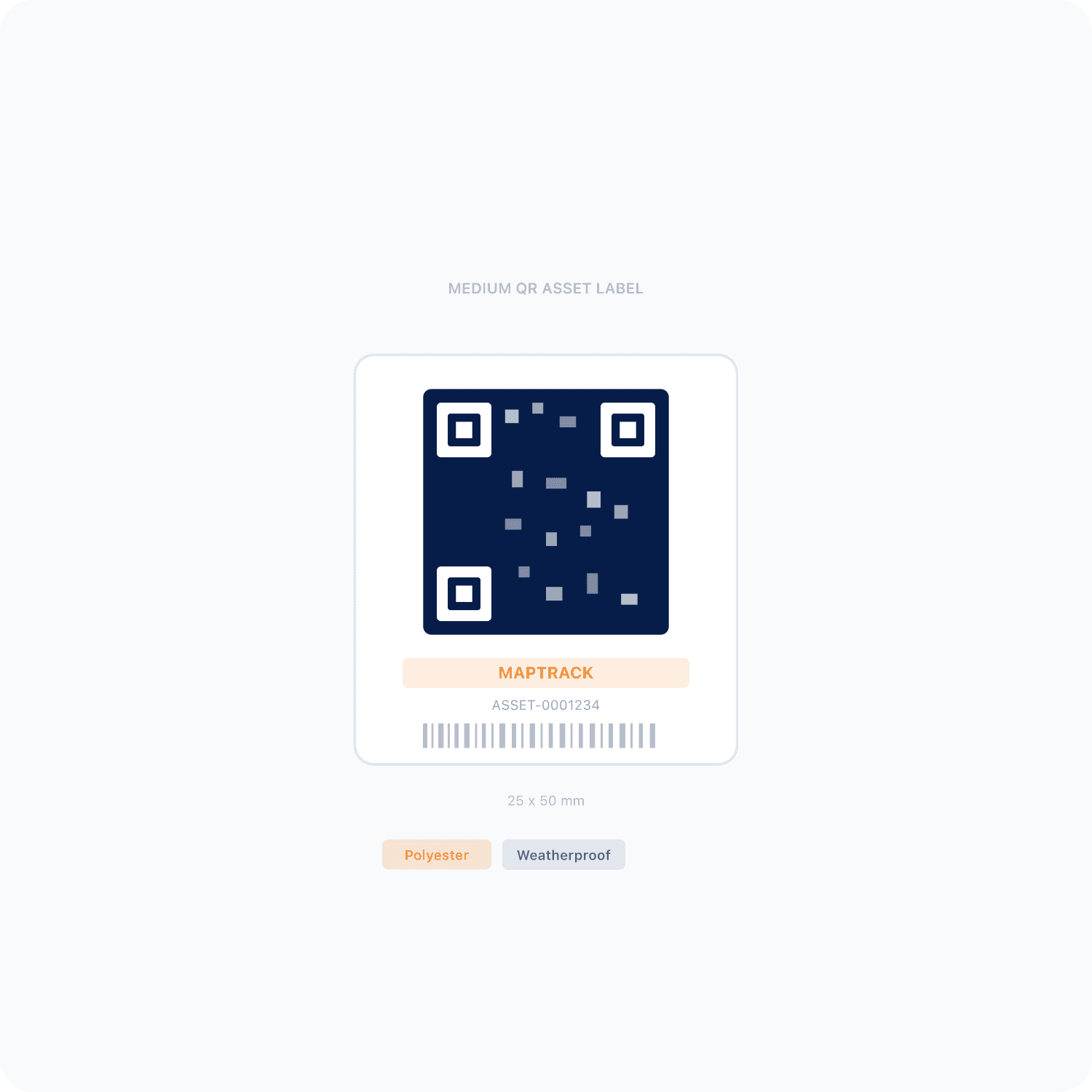
Generate QR tags and confirm each one opens the intended asset record.
Test the handover
While connected, check an asset out to a person or site and record its return. Review the assignment history.
Extend the setup
Add the forms and service schedules your team needs, then test those workflows with the people who'll use them.
Frequently asked questions
Ready-to-use asset tracking templates
Download free PDF-ready templates. No sign-up required.
Start tracking assets this week
Join teams using MapTrack for asset tracking across sites and crews.
- No credit card required
- Unlimited users
Related definitions
Key terms explained in our glossary